Special Education Operations
- Access to programs that will lead to graduation, career and/or life development.
- Opportunities to attend a rigorous, challenging and engaging instructional program tailored to their unique needs.
- Improved school attendance.
- The needs of students come first in all of our work.
- Families are critical partners to school success and we respect and engage this dynamic.
- Supporting classrooms is an essential component to success.
- Data collection and analysis is a critical tool to effective programs and accountability indicators for program improvement and excellence.
- IEP placement support
- Transportation for students with disabilities
- Extended School Year (ESY) operational support
- IEP translation services policies & procedures
- Human resources allocation
Extended School Year (ESY)
Extended School Year (ESY) services are special education and related services that are provided to a student with a disability beyond the regular school year based on their IEP.
When to use it
When informing and assisting eligible students to enroll in ESY.
How to request / steps
Notes
Information regarding 2027 Extended School Year (ESY) will be available during the Spring 2027 semester.
IEP Oral Interpretation
What it is
Per REF-1596, principals must ensure that qualified bilingual school site personnel are available to provide oral interpretation at IEP team meetings and must send eligible classified bilingual staff to the District’s Oral Interpretation at IEP Team Meetings Training (OIT).
When to use it
When a parent/guardian needs interpretation during an IEP team meeting.
How to request / steps
-
Ensure site has qualified/eligible staff
-
Register staff for OIT in MyPLN
-
If needed, request an interpreter via Translations Unit
Links / Forms
- REF-1596.17 – Oral Interpretation at Individualized Education Program (IEP) Team Meetings
-
Interpreter requests: https://www.translationsunit.com/
Contacts
-
Oscar Rodriguez, Coordinator – [email protected]
-
Sandra Torres, Specialist – [email protected]
Notes
Principals must submit the School Roster of Staff Eligible to Interpret by October 31st annually.
Additional Information can be found on https://sped.lausd.org/apps/pages/OIT
IEP Written Translation
What it is
REF‑6349.3 updates and informs school sites and District offices of the process of requesting a written translation of an IEP.
When to use it
Any time a written translation of an IEP/related document is required.
How to Request a Translation: Step-by-Step Guide
-
Requesting an Official Written Translation of the IEP
- In Section N: Procedural Safeguards and Follow-Up Actions (pg. 9 of the IEP), indicate the translation request and specify the required language.
-
Save and finalize the IEP to activate the request.
-
Requesting a Computer-Generated Written Translation of the IEP for Spanish Only
- In Section N: Procedural Safeguards and Follow-Up Actions (pg. 9 of the IEP), select “Yes” for Parent Requesting Computer-Generated Translation. Currently, the system only supports computer-generated translations in Spanish.
- To print the IEP must be completed and locked.
- Refer to Translation Job Aide Final.pdf for guidance.
-
Documenting Delivery of the Translated IEP to Requestor
- Click the Document Delivery button and complete all required delivery fields.
- Job Aide: Documenting Delivery of Translated IEPs Through Welligent - Coming Soon
- Requesting Translation of Documents Related to the IEP
- Prepare all documents in Microsoft Word format.
- Submit the documents through the Translations Unit Portal.
- For assessment reports, follow the required Translations Unit forms and procedures.
Links / Forms
- REF-6349.3 – Submitting Request for Written Translation of Individualized Education Program (IEP) and Related Documents
-
LAUSD Translation Unit English/Spanish Glossary of LAUSD Terminology
Contacts
-
Oscar Rodriguez, Coordinator – [email protected]
-
Sandra Torres, Specialist – [email protected]
Notes
Assessment translations: Only Word files are accepted. Staffing/budget may impact timelines. Translation requests are made through the District Translations Unit forms and procedures.
Inter‑District Permits / SELPA Agreements
What it is
Guidance for attending school outside district of residence.
When to use it
When a student seeks/holds an inter‑district permit, including students with disabilities.
How to request / steps
-
Submit permit applications to the Office of Permits
-
Review BUL‑5341.3 and PSA site
Links / Forms
-
PSA Permits: https://www.lausd.org/page/17471
Contacts
-
Office of Permits (per PSA site)
Notes
Follow current timelines and required documentation.
Low Incidence Equipment Transfers
What it is
Process to move low-incidence equipment between school sites.
When to use it
When equipment (e.g., stander, walker, gait trainer) must be transferred.
How to request / steps
-
Contact assigned PT/OT or Nurse.
-
Complete RSY Transfer Form(s), Google Transfer Request Intake Form and Equipment Transfer Label.
-
Upload and submit RSY Transfer Form(s).
Links / Forms
Contacts
-
Assigned PT/OT/Nurse
Records Requests (Custodian of Records)
What it is
COR provides copies of Special Education records, such as Individualized Education Programs, Service Tracking Records, assessment reports, and other available special education-related records
When to use it
When parents/guardians or LEAs request special education related records.
How to request / steps
-
Parents and/or guardians must complete a Pupil Records Request Form available for download by clicking this link. The completed form may be sent by mail, fax, or email.
Links / Forms
- Submission Guidance for Parents/Guardians & LEAs
- Records Request Information: English | Spanish
- Parent/Guardian Request for Records – Fillable: English | Spanish
- For additional information: https://sped.lausd.org/apps/pages/COR
Contacts
Division of Special Education - Custodian of Records
333 S. Beaudry Avenue, 18th Floor, Los Angeles, CA 90017
Email: [email protected] | Subject Line: Pupil Records Request, COR
Fax: (213) 241‑2417 | Attn: Division of Special Education – Custodian of Records
Phone via SFSS: (213) 241‑6701
Notes
District‑Operated and Charter‑Operated Schools follow the same submission destination.
Rapid Access Program (Accessibility)
What it is
A refined replacement for the former 'on-demand' program for minor facility modifications.
When to use it
Use when immediate program accessibility is needed while accessibility construction is in progress.
How to request / steps
-
Implement an “Operational Solution” while RAP/barrier removal proceeds
-
Review REF‑066902.1 and ADA site
Links / Forms
-
Office of ADA Compliance: http://generalcounsel.lausd.org
Contacts
-
Office of ADA Compliance / Division Operations
Notes
Document interim solutions provided to ensure program access.
School & Family Support Services (SFSS) Call
What it is
SFSS supports the District in maintaining substantial compliance with federal education laws by ensuring that policies, procedures, and practices are followed.
When to use it
When families, community members, and staff need assistance with inquiries, concerns, and complaints related to special education.
How to request / steps
-
Call the SFSS Call Center
Links / Forms
-
REF-049897.4 – Special Education School and Family Support Services (Call Center)
- For additional information: https://sped.lausd.org/apps/pages/SFSS
-
(213) 241‑6701
Parental Choice Programs – Magnet
What it is
Guidance for students with disabilities in Magnet schools.
When to use it
When an IEP intersects with Magnet selection/acceptance.
How to request / steps
-
If an IEP is developed after acceptance into a Magnet: Current school contacts magnet coordinator to confirm acceptance and discuss accommodations. The Magnet School is identified in the FAPE offer. Transportation is marked as “none” on the Fape offer (student may still be eligible for magnet transportation).
- If a student has an IEP before applying/being selected to a Magnet:
- Review the student’s IEP to determine comparable services and supports. This review must occur within the first 30 days of enrollment. Magnet school administrator or designee may reach out to the Division of Special Education for consultation. Here are some different scenarios that may occur:
- For students with Resource Specialist Program (RSP) services included in their IEP, the parent’s letter of selection will serve as written acceptance of the District’s FAPE offer until the next regularly scheduled IEP team meeting is convened to document the magnet school placement. A 30-day IEP is not required.
- Students with Special Day Program (SDP) included in their IEP and the magnet school does not have the SDP, a 30-day IEP meeting should be held to discuss and address change of setting and services at the magnet site.
- When the student’s instructional needs are unable to be met by the magnet program, the magnet program is to schedule an IEP to discuss the Least Restrictive Environment (LRE) for the student. Every effort should be made to accommodate the student’s need at the magnet program.
- Review the student’s IEP to determine comparable services and supports. This review must occur within the first 30 days of enrollment. Magnet school administrator or designee may reach out to the Division of Special Education for consultation. Here are some different scenarios that may occur:
Links / Forms
Contacts
-
(213) 241-6532
Notes
Students with disabilities are selected using the same criteria as nondisabled peers.
Parental Choice Programs – Zone of Choice (ZOC)
What it is
Assignment and enrollment within Zones of Choice boundaries.
When to use it
When students (including SWDs) reside in a ZOC catchment.
How to request / steps
- ZOC office assigns students based on preference and school capacity.
- Students must apply and may choose from any school option within the Zone.
- Students should rank schools in order of preference.
- Assigned school becomes home school upon enrollment.
- Schools must enroll and provide full services per District policy.
Links / Forms
- Zones of Choice: https://www.lausd.org/domain/291
- REF-6047.1 – Matriculation of Students with Disabilities Into the Catchment Area of a Zone of Choice
- REF-6296.1 – Zones of Choice: Identification, Assignment and Enrollment of Students Residing Within a Zone of Choice Attendance Boundary
Contacts
-
ZOC Facilitator (per Zone)
-
ZOC Office: (213) 241-0466
-
Email: [email protected]
Notes
- SWDs are assigned using the same policies and procedures as non-disabled students.
- The Special Education office works with ZOC schools to ensure full services are provided.
- Each Zone has a ZOC Facilitator responsible for coordinating student articulation, new enrollments, and assignments.
Transportation Services Requests
What it is
IEP‑determined related service; guidelines for requests and updates. For more information: BUL‑5003.3 – Transportation Guidelines for IEP Teams
When to use it
When an IEP calls for transportation or when updating a current assignment.
How to request / steps
-
Verify eligibility and enrollment
-
Confirm transportation eligibility per an active IEP.
-
Ensure the student is enrolled in MiSiS in their school of attendance.
-
Verify Classroom Management assignment.
-
-
Submit request form (must use LAUSD Single Sign-On)
-
Select request type
-
Activate transportation
-
Inactivate transportation
-
Update release information
-
Change pick-up and/or drop-off address
-
Add adult support
-
Add SMTI info (e.g., child seat, safety vest, lift bus) — must be included if applicable.
-
Links / Forms
- 2026-2027 RSY Transportation Services Requests
- 2026-2027 Preschool Transportation Services Requests
-
SE‑61 Release of Responsibility Form
-
Provided if a parent requests to release the adult from meeting the bus.
-
Before approval, consider: age/grade, program, health/medications, behavior, para/BII support, and other safety concerns.
-
There must always be an adult present at the drop-off location.
-
The form only:
-
Relieves the adult from making themselves visible to the driver.
-
Relieves the driver from identifying the receiving adult.
-
-
Once signed, email the form to [email protected] for processing.
-
Contacts
-
(213) 241‑6701
-
[email protected] (SE‑61 processing)
Notes
-
Always use the least restrictive transportation option appropriate for the student.
-
Schools must follow BUL-5003.3 for all transportation determinations and requests.
Placement Support: K‑12 (Regional)
What it is
Prospective program options and feasibility checks by region.
When to use it
5–10 days before a scheduled IEP; submit a new request if FAPE is delayed >15 days.
How to request / steps
-
Submit regional “Request for Program Options”
-
If program is >2 miles from residence, complete a Transportation Feasibility Check (regional team)
-
Use Expulsion/Interim forms when applicable
Links / Forms
-
Region East: 2026-2027 Region East K-12 Request for Program Options | 2026-2027 Transportation Feasibility Check (To Be Completed by Regional Team) | 2026-2027 Expulsion/Pre-Expulsion Requests (All Regions)
-
Region North: 2026-2027 Region North K-12 Request for Program Options | 2026-2027 Transportation Feasibility Check (To Be Completed by Regional Team) | 2026-2027 Expulsion/Pre-Expulsion Requests (All Regions)
-
Region South: 2026-2027 Region South K-12 Request for Program Options | 2026-2027 Transportation Feasibility Check (To Be Completed by Regional Team) | 2026-2027 Expulsion/Pre-Expulsion Requests (All Regions)
-
Region West: 2026-2027 Region West K-12 Request for Program Options | 2026-2027 Transportation Feasibility Check (To Be Completed by Regional Team) | 2026-2027 Expulsion/Pre-Expulsion Requests (All Regions)
Contacts
-
Your Region team (SES/LRE/Operations)
Notes
Keep preparatory activities documentation with the IEP record.
Placement Support: Preschool (All Regions)
What it is
Centralized preschool placement request process.
When to use it
For any preschool placement request across regions.
How to request / steps
-
Complete the 2026-2027 Preschool Placement Requests Form
-
Submit Transportation Request (feasibility will be reviewed)
Links / Forms
Contacts
-
Region East: Maria Avila — [email protected]
-
Region North: Kay Jang — [email protected]
-
Region South & West: Jessica Lopez — [email protected]
-
Administrator: Cesar Rodriguez — [email protected]
Notes
Confirm service needs and timelines prior to submission.
Placement Support: Central Office Use Only (K‑12)
What it is
Central Office request paths for program options/feasibility.
When to use it
When directed for Central Office processing.
How to request / steps
-
Use the Central Office K‑12 Request for Program Options
-
Submit Transportation Feasibility Check if >2 miles
-
Use Expulsion/Interim form as needed
Links / Forms
Contacts
-
Central Office Operations
Notes
Follow Central Office instructions for routing and timelines.
Paraprofessionals
|
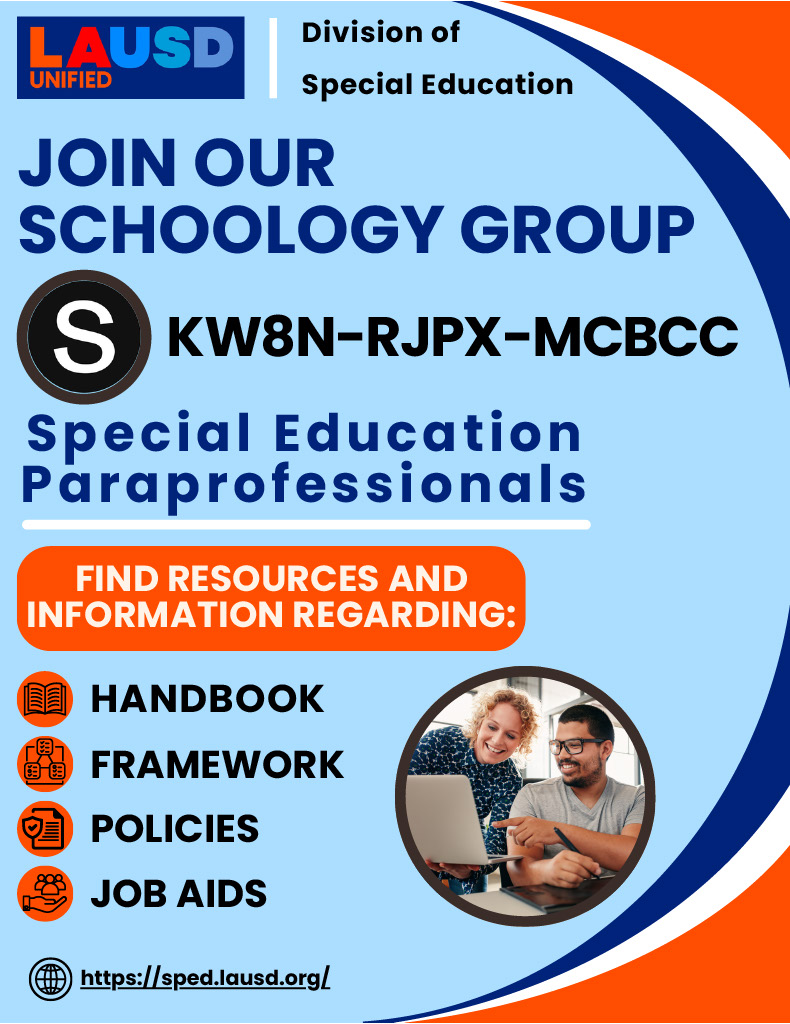
Join our Schoology Groups
Special Education Paraprofessionals: KW8N-RJPX-MCBCC District Behavior Intervention Implementation: RW9B-DRPM-CPNZ8
Behavior Support Department: Q2CG-Q48D-HK8W9
Resources
|
|